Bosch System Screen
This screen displays the status of the bosch system as well as the related drives and allows to perform several actions with it.
The main ones are:
Switching to observation mode, where the power for both cable wraps is kept ON and the power for all the auxiliary drives (Mirror Covers, Balancing, Locking pins and Deployable platforms) is OFF.
Switching to engineering mode, where everything is ON.
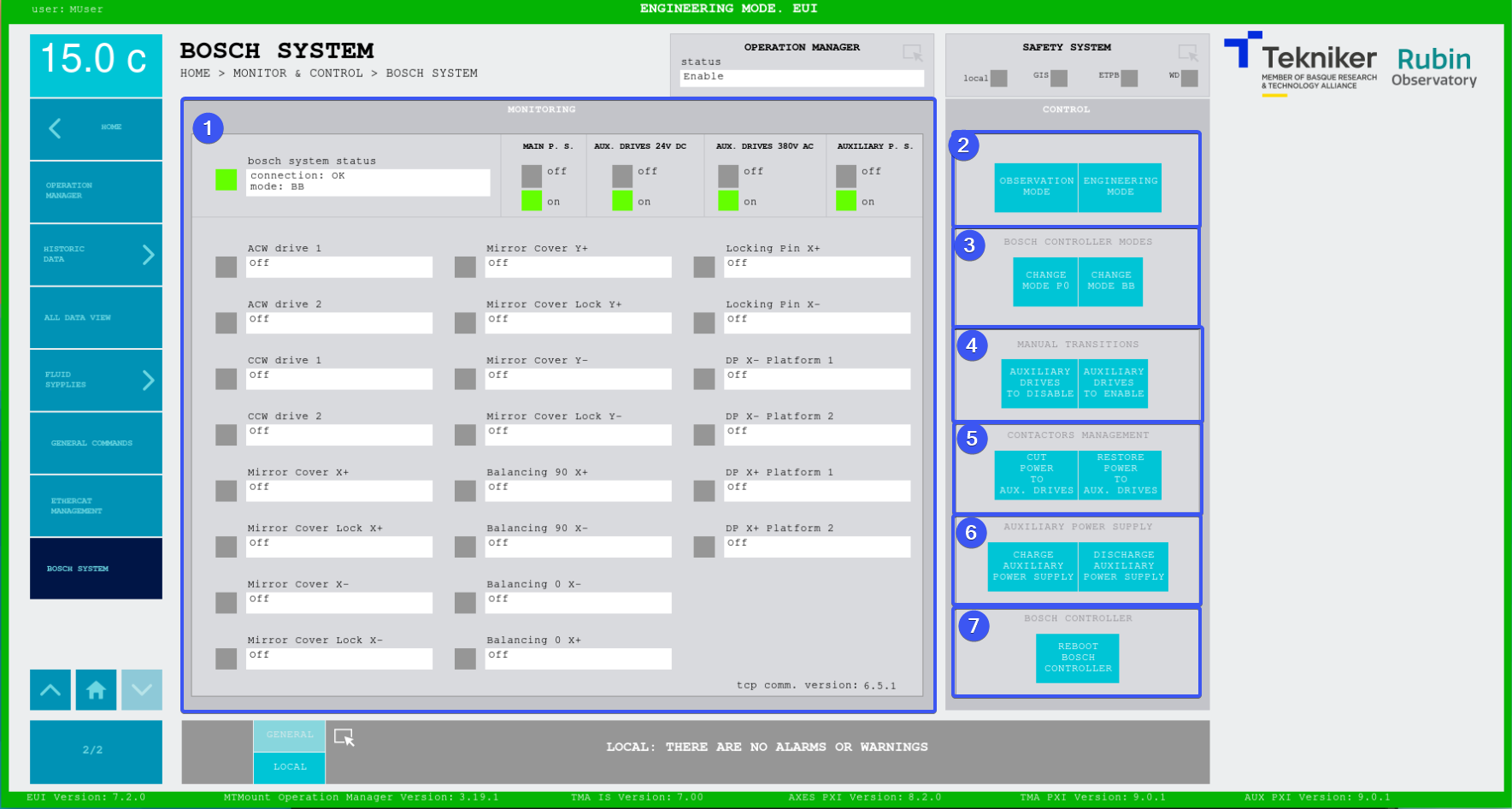
Figure. Bosch System screen.
ITEM |
DESCRIPTION |
|---|---|
1 |
Displays the status of the bosh system and the bosch drives
|
2 |
Softkey “OBSERVATION MODE”: sets the system in the proper state for observation, ONLY cable wrap drives are powered. more doc on the command here Softkey “ENGINEERING MODE”: sets the system in the proper state for engineering, all bosch drives are powered. more doc on the command here |
3 |
Softkey “CHANGE MODE P0”: sets the bosch controller state to P0 more doc on the command here Softkey “CHANGE MODE BB”: sets the bosch controller state to BB more doc on the command here |
4 |
Softkey “AUXILIARY DRIVES TO DISABLE”: change the drives listed in the `AuxiliaryDrivesMotorIDs` setting to *disabled* state more doc on the command here Softkey “AUXILIARY DRIVES TO ENABLE”: change the drives listed in the `AuxiliaryDrivesMotorIDs` setting to *enabled* state more doc on the command here |
5 |
Softkey “CUT POWER TO AUX. DRIVES”: set the value of the digital signals controlling the 24V and 380V contactors to *FALSE* more doc on the command here Softkey “RESTORE POWER TO AUX. DRIVES”: set the value of the digital signals controlling the 24V and 380V contactors to *TRUE* more doc on the command here |
6 |
Softkey “CHARGE AUXILIARY POWER SUPPLY”: charge the auxiliary drives power supply more doc on the command here Softkey “DISCHARGE AUXILIARY POWER SUPPLY”: discharge the auxiliary drives power supply more doc on the command here |
7 |
Softkey “REBOOT BOSCH CONTROLLER”: send reboot request to the bosch controller and wait for it to be rebooted, a pop up will appear to config the operation. more doc on the command here |
Items 3, 4, 5, 6 and 7 are only visible for maintenance level users
Drives states
These states are displayed in the bottom part of section 1.
Drive State |
Meaning |
|---|---|
NOT Control and Power Ready |
Drive not ready to be used by the corresponding subsystem |
Discrete Motion |
Drive moving discretely |
Standstill |
Drive on and waiting |
Off |
Drive off |