Set TMA performance settings
Introduction
The TMA EUI allows changing many settings. One of the most important during operations is the mount movement settings: speed, acceleration, and jerk. These values are grouped into performance settings files. You can find the list of available performance settings in the Settings Set Management view.
[!IMPORTANT] TMA settings are cumulative, if you do NOT
RESTORE ALL TO DEFAULTyou keep previous settings applied.
Precondition
Azimuth and Elevation drives must be powered off.
Procedure
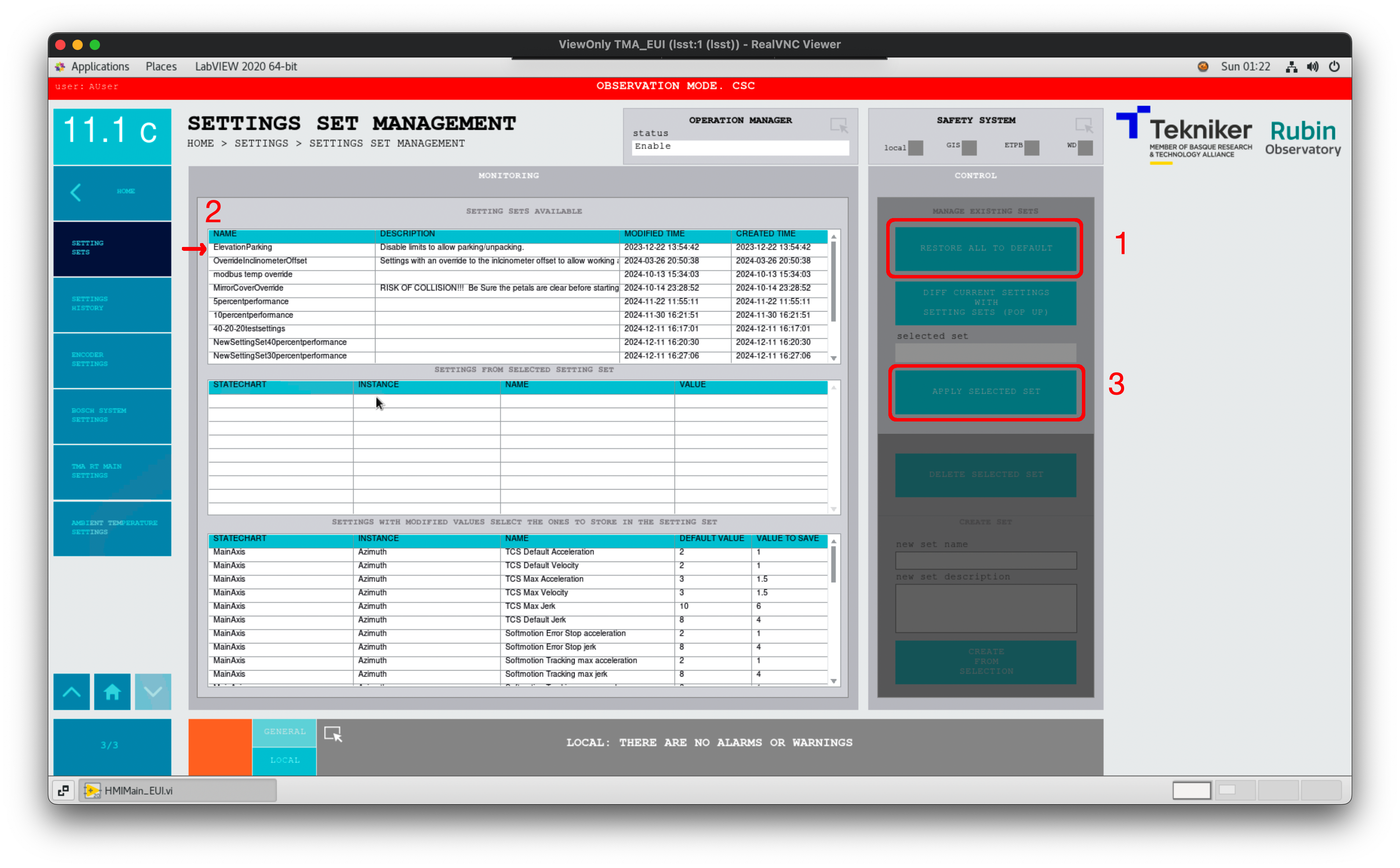
Go to HOME > Settings > Settings Set Management view. See the figure below, displaying the steps to follow.
Press
RESTORE ALL TO DEFAULT. This will set the TMA EUI default settings for velocity, acceleration and jerk for both axes, which normally is 5%.Select the desired settings from the Setting Set Available section, e.g. ElevationParking or 10percentperformance.
Verify the settings have changed in the Home > Settings >:
Alternatively, you can verify the settings in the EFD (Engineering Facility Database), which you can access through Chronograf.
[!IMPORTANT] ElevationParking ONLY disables the elevation limits (set to FALSE), it does NOT change velocity, acceleration and jerk limits values.