Insert Locking pins without homing
Requested by: |
AURA |
|---|---|
Doc. Code |
#{documentCode} |
Editor: |
A. Izpizua |
Approved by: |
J. Garcia |
Index
Introduction
For fine balancing, the elevation locking pins are free, allowing the TMA elevation axis to move through its range, while for coarse balancing, the locking pins are in the TEST position and is performed with the motors.
If homing is not possible or not recommended, the locking pins cannot be reinserted from the free position into any other position. This document describes how to proceed in that situation.
When homing is not done the Elevation position is not accurate because it’s taken from the inclinometer. The strategy is to take note of the position as soon as the Elevation drives power ON, although it lacks accuracy, it is precise (repeatable in time). If the Elevation drives are powered OFF measurements remain consistent.
Precondition
Elevation locking pins in FREE position.
An engineering task requires to insert the Elevation locking pins without homing.
Be authorized to perform this procedure.
Procedure
To insert locking pins without homing:
Power ON the Elevation drives.
Take note of the Elevation position.
Move Elevation axis to 0 degrees or 90 degrees.
Move to the noted position of step 2.
Power OFF the Elevation drives.
Insert locking pins by overriding its settings, refer to the section below.
Disabling and Enabling Locking pins Elevation check
The DisableElevationPositionCheck set to TRUE allows operating the locking pins without checking the TMA elevation.
[!WARNING] This setting must only be changed by authorized, trained personnel and with extreme caution. If the telescope is not properly aligned with the locking pin position before insertion, the pin may be damaged.
Go to Home > Settings > Locking Pin Settings
Click on
DisableElevationPositionCheckand change the value to TRUEAfter the procedure is done, set
DisableElevationPositionCheckto FALSE
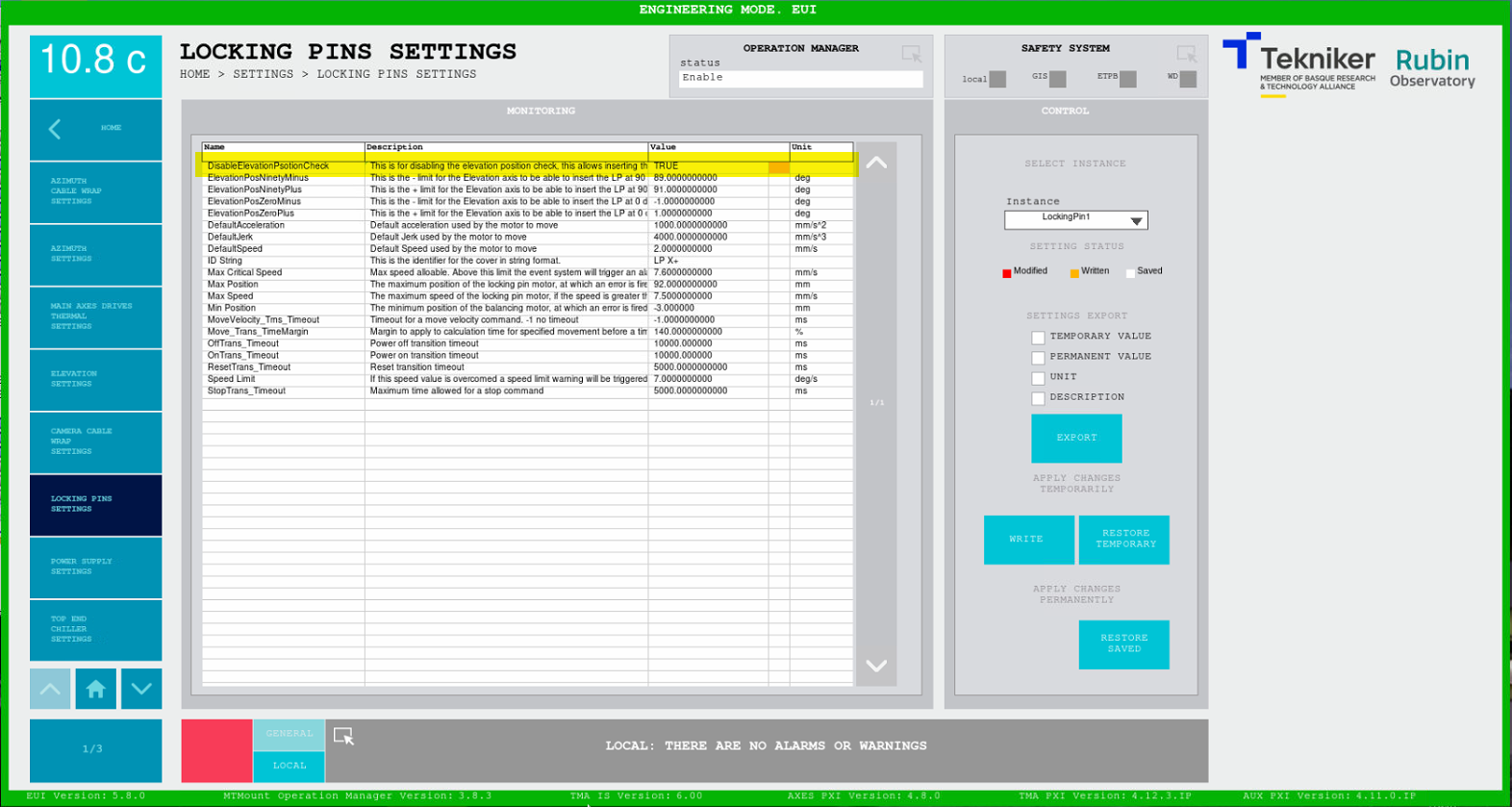
❗ This setting should always be False if it is not necessary ❗